ERD Visualization
Zentro generates an Entity-Relationship Diagram from your live schema — no configuration, no manual drawing.
The ERD is scoped to one table and its relationships, not the whole database at once. Open a table and expand outward from there rather than expecting a full-schema diagram.
Opening the ERD
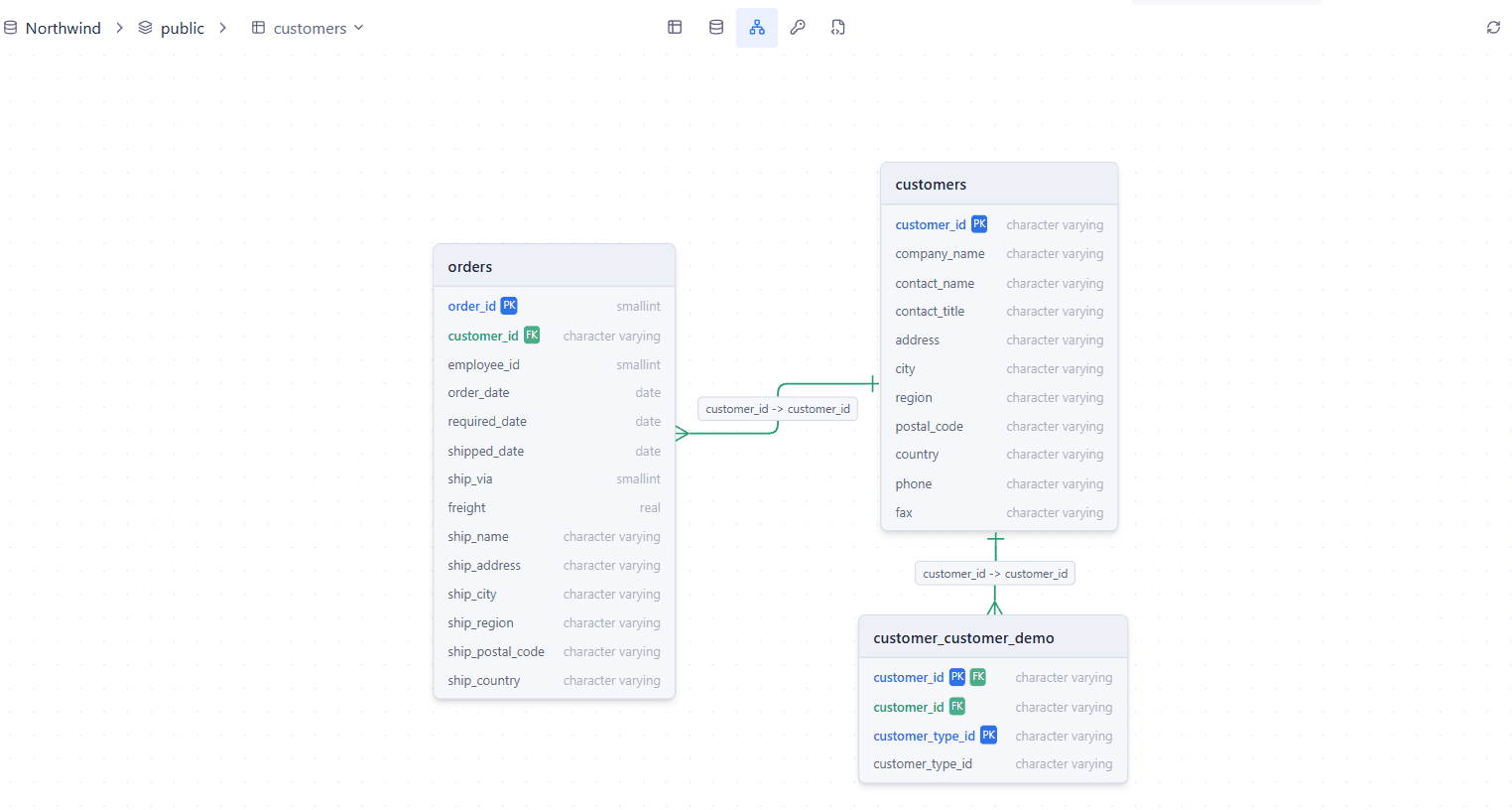
Open a table from Schema Explorer, then switch to its ERD tab. Zentro loads that table plus every table it's directly connected to via foreign keys, one level deep.
What's Shown
Each table renders as a card listing its columns:
- PK badge — primary key columns
- FK badge — foreign key columns
- Relationship lines connect FK columns to the primary key they reference, with a label on the edge; click an edge to see the underlying constraint details
Navigation
Pan and zoom with your mouse/trackpad, same as any React Flow canvas — there's no dedicated zoom or fit-to-screen button.
Creating a Relationship
Drag from one column's connector handle to another to create a new foreign key between them — Zentro opens a dialog to name the constraint and set ON DELETE/ON UPDATE behavior before applying it.
Supported Databases
ERD generation works for any connected database driver that reports foreign key relationships (PostgreSQL, MySQL, SQL Server, SQLite). Databases/tables with no FOREIGN KEY constraints defined will show as isolated tables with no edges.