Intelligent Features
Zentro's intelligent layer uses your live schema and database engine feedback to help you write correct SQL faster and catch mistakes before they reach the database.
Schema Detection
When you open a query or start typing, Zentro inspects the SQL and detects:
- Which tables are referenced — auto-resolves
FROM table_nameagainst the schema explorer - Which schema prefix to use — if you reference
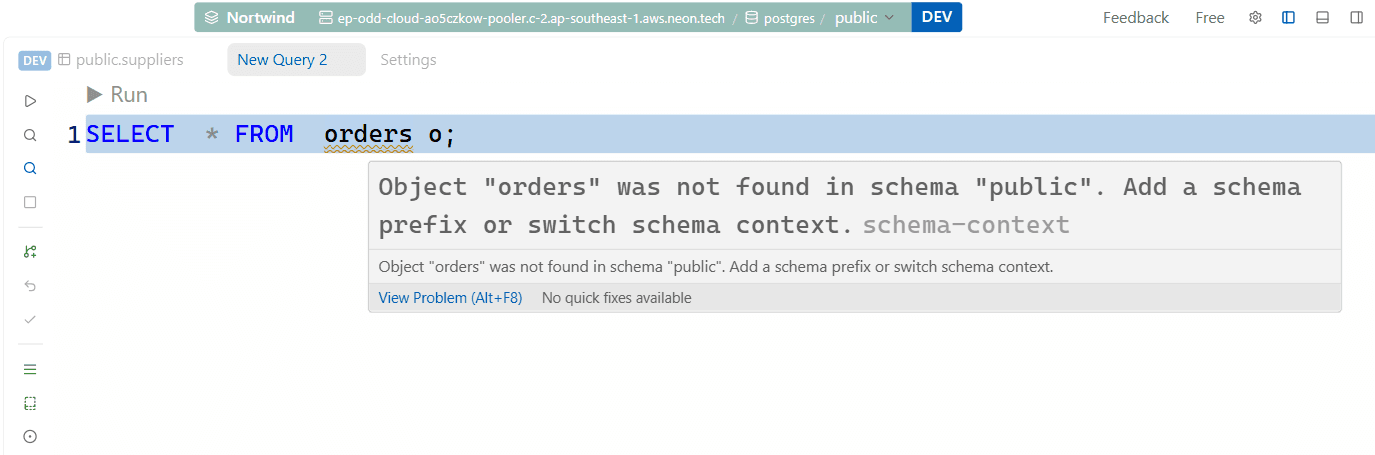
accountsand the table exists inpublicbut you're connected to a schema where it doesn't exist, Zentro warns you inline (as shown in the screenshot:Object "accounts" was not found in schema "pg_toast". Add a schema prefix or switch schema context.) - Column name validity — after detecting the table, Zentro validates column names in
SELECT,WHERE,JOIN ON, andORDER BYclauses
Schema Context Switching
If Zentro detects a table that exists in a different schema, a Quick Fix (Ctrl+.) is offered:
- Add schema prefix — rewrites
FROM accountstoFROM public.accounts - Switch schema context — changes the active schema in the Schema Explorer to where the table was found
Errors
When a query fails, the error message from the database engine shows in the Result panel. If the error looks like it's caused by referencing an object that exists in a different schema than the one you're connected to, Zentro adds a schema-context hint to help you find it — on top of the inline schema warnings and Quick Fix described above.
Auto-complete
The editor's auto-complete (Ctrl+Space) is part of this same schema-aware layer — see Auto-complete in the SQL Editor page for the full breakdown.
Type Annotations in Results
Data Grid column headers show a small data-type icon; hover it for the full type (TEXT, INT4, TIMESTAMPTZ, etc.) and other column details. This helps you understand what you're looking at without running \d table_name.
Future Intelligent Features
The intelligent layer is designed to grow. Planned additions include:
- Query explain hints — automatic
EXPLAINanalysis with plain-English interpretation - Index suggestions — identify slow queries missing an index and suggest the right one
- AI-assisted query generation — natural language to SQL (opt-in)
These will appear in future releases without requiring any configuration changes.
Destructive query warnings are already live. Detecting DELETE or UPDATE without a WHERE clause is part of the Production Safety system — available on Free as a warning and on Pro as a hard block.